Just Another Typical Day

| 0 comments |
This past Wednesday (February 6) was the second annual Digital Learning Day.  New Milford High School joined thousands of other schools and educators across the country to showcase how digital learning is changing education.  The only thing though is that this day was just like any other typical day at my school as digital learning has become an embedded component of our schools culture.  For years we have embraced the effective integration of technology to enhance the teaching and learning process.  


For the sake of Digital Learning Day I asked my staff to share some of the activities that they planned and implemented.  Below is a listing of some of activities that incorporated digital learning:

  • In Mrs. Collentine’s Humanities class, students worked in the computer lab on researching the history of drama and theater in the culture of their own heritage. They then had to create a Prezi, PowerPoint or Google Doc presentation to be shared at a later time on what they found/learned to the class.
  • In Mrs. Paulus’s Senior English Survey class, students worked in the computer lab to conduct research on a travel destination of choice in the U.S.  They then selected an automobile based on gas mileage and comfort level for distance. Students calculated travel expenses, such as hotels, gas, attractions, etc. and planned the trip from start to finish having 6000 dollars to spend for 12 days.  For a final project, each student had to create brochures and posters using technology tools to accompany a written paper detailing their trip.
  • One of the biggest fears among students in an inquiry based setting is that they dont feel ready for the discovery task. They also feel that the teacher is too smart and just because she solved a problem easily on the board doesnt mean they will be able to do the same. Ms. Chowdhury’s plan in Physics was for students to use their iPads/tablets and create screen casts of them solving a dynamics problem with details of every step. The students then kept the screen cast as live notes to use on any homework assignment or before a test. The advantage of solving the problem on screen cast versus notes is that it records their voice so they can hear the reasoning behind doing a step the way it was done. She also plans to use these screen casts next year to show students that other students, just like them, had solved the same problems before and find comfort in knowing that nothing is being demanded of them that is beyond their ability.
  • Mrs. Groff’s, Mrs. Aufiero’s, and Mrs. Montecuollo’s collaborative English classes wrapped up a WebQuest in the computer lab.  The students looked at various websites that deal with modern day injustices and evaluated the resources.  They then researched a particular injustice and found/evaluated at least 2 reliable sources about that injustice.  This information will be turned into a research project at the end of the period. 
  • Mrs. Groff’s Digital Journalism class researched and wrote stories, as per any other normal day in class. Her other English classes took a virtual tour of the Globe Theater and learned stage directions for the Shakespearean historical play, Julius Caesar.  
  • Ms. Millan’s Sociology students learned how to use and create their own blog using Blogger from their Gmail accounts.  She discussed the purposes and goals of blogging and allowed students to create their own blog based on a guided question from her site. The Blog topics were additional topics of conversation relevant to their chapters of study such as socialization, deviance and crime; love, marriage and the family.
  • Mr. Fiscina’s Honors Geometry students were instructed Tuesday in class that their homework was to log onto Edmodo and watch a lesson about Area of Regular Polygons.  He used an app on his iPad called Educreations to create the lesson. Students came into class on Digital Learning Day and were given an assignment that needed to be completed.  Students who understood the lesson got started right away.  Students that needed help were able to ask questions and get assistance from Mr. Fiscina.  The class was then sectioned off for students in 3 categories (understood the lesson, only a few questions, and need a lot of help).  This way Mr. Fiscina was able to spend the most time with the students that needed a great deal of help and less time with the students who understood the lesson.  Challenge problems were given for students who mastered the material quickly.  All work was collected and checked for understanding and conceptual mastery.  He also had students use Poll Everywhere to check for understanding in the beginning of the lesson.  
  • Since the “flipped” approach to instruction is proving to be a key asset in modern education, one of Mrs. Chellani’s recent initiatives has been to provide students with a means to learn independently utilizing digital content.  Starting in December 2011, she began using Edmodo, an online platform that enables innovative and social learning, as a way to share online videos and content on the relevant topic for her students to view and assign online polls for her students to complete in order to foster discussion on the topic the next day.  Although enabling the “flipped” approach to instruction using Edmodo has transformed the way material is taught and comprehended by students, it has been difficult to find resources that combine curriculum delivery, real-world examples, and assessments in a cohesive manner.  As a result, she has started to create her own online learning modules, using the software Adobe Captivate.  On Digital Learning Day, Mrs. Chellani introduced her website to her students and demonstrated how these interactive videos will be utilized for future instruction.
  • Ms. Perna utilized computers with her classes to facilitate student learning and growth.  Students in her US I classes conducted research to help them work on the writing process.  Students in US I CP went through the research process to develop an outline for an essay focusing on which of the early presidents they believe was most effective/influential.  Students in US I conducted research to write a biography on an influential early American.  Her US II classes worked on a “Roaring Twenties” project.  They put together, in a creative manner, a presentation on one cultural aspect of the twenties (music, fashion, women, food, etc) that will be presented in class at the end of the week during a “Roaring Twenties Cultural Day.” 
  • Works of art and architecture, not unlike historical documents, biographies, or works of fiction, are a testament to particular cultures and historical events. The purpose of the assignment in Mr. Tusa’s AP European History class was to have students reflect on the manner in which works of art or architecture can help them capture, represent, or express in visual form contrasts between different cultures.  Students had to compare/contrast each of the respective pair of works of art/architecture listed below in terms of the manner in which each work represents some key aspect(s) of a particular culture. The key idea was for them to be able to discern those differences in the works that help to explain differences in the particular culture they capture or represent.  Students worked in pairs using Mac Books to record comments on a shared Google Doc. They then used teacher provided links to locate the works (http://www.wga.hu/ and http://www.chateauversailles.fr).  Other websites/links could be used only with the prior permission from Mr. Tusa.  The length of the comments/critique had to be 100 words per work. Works included Michelangelo’s “David”, Giacometti’s “Man Walking”, Francisco Goya “The Third of May”, Picasso’s “Guernica”, Bruegel’s “Peasant Dances”, Seurat’s “Sunday Afternoon on the Island of the Grand Jette”, El Escorial, Versailles, image of the interior of a Protestant, and image of the interior of a Catholic Church
  • For Ms. Ginter’s Physical and Environmental Science Resource Class, the students investigated concepts regarding earthquakes and tsunamis, then related them to Newtons Laws. On the computers, they explored the different activities with a partner and completed concept maps to go along with them, using question prompts along the way. For her Biology class, the students worked with partners using the computers in class and their mobile learning to conduct an investigation to identify who first coined the term cells and what aided this discovery. They then identified the characteristics of and differences between eukaryotic and prokaryotic cells and completed a Venn diagram. There was an assignment up on Edmodo for them to respond to regarding cell theory for homework.
So what did you do on Digital Learning Day 2013?
Read More..

New APK Market iMarketApk » Active Soccer 2 v1 0 9

| 0 comments |
Active Soccer 2 v1.0.9

Requirements

http://iMarketApk.blogspot.com/ [New] APK Market iMarketApk » Active Soccer 2 v1.0.9 [Torrent Modded apk] Free APK are available on every other topic you can think of in both fiction and non-fiction of. There are free Android APK available for adults and children and even between and teenagers. It may seem overwhelming to find and download [android apk] Hack no survey [New] APK Market iMarketApk » Active Soccer 2 v1.0.9 ҩ MOD but with the steps below youll be just minutes away from getting APK.: 1.5+

http://iMarketApk.blogspot.com/ - Overview about Active Soccer 2 v1.0.9

Full Download MOd [New] APK Market iMarketApk » Active Soccer 2 v1.0.9 and Torrent Link

: The most awaited football game sequel is now available!!!

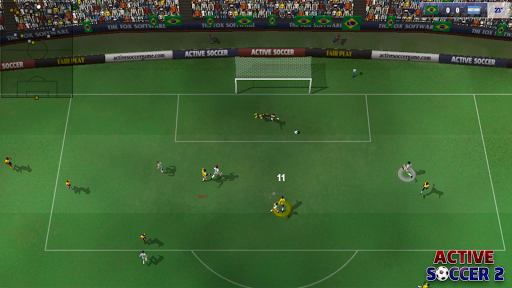
Active Soccer 2 is an innovative top-view arcade football game providing a fast paced arcade experience implementing an amazing playability and easy to learn - hard to master responsive controls.

With Active Soccer 2 you have a full control on the game, no scripted goals, no CPU driven decisions!

Active Soccer 2 provides a complete career mode, implementing the major part of the existing international leagues, cups and championships. Imagine to be a manager of a 5th English division team, you have a budget and your goal is to be promoted to higher divisions, purchasing players, drawing tactics, managing team and play real matches!

- Career mode, supporting 800 teams (club and national) from all over the world and 21000 players with different skills

- Competition designer

- Team editor

- Weather conditions

- Different camera view: you can play vertically, horizontally or with a diagonal view

- Online cross platform matches

- OTG USB Controllers supported

- Soundtrack created by Chris Huelsbeck

- Amazing fun!

Whats new:

various bug fixing

More Info Active Soccer 2 v1.0.9

You can directly download the apk file with torent modded or just in iMarketApk

Android APK Files [New] APK Market iMarketApk » Active Soccer 2 v1.0.9 Full And No Hack No Survey No ROOT

:

https://play.google.com/store/apps/d...ctivesoccertwo

Download Instructions:

Download Url

Mirror:

Download Url

Download Url

Read More..

New APK Market iMarketApk » WiFi Channel Analyzer v3 06 Mod Ad Free

| 0 comments |
WiFi Channel Analyzer v3.06 [Mod Ad Free]

Requirements

http://iMarketApk.blogspot.com/ [New] APK Market iMarketApk » WiFi Channel Analyzer v3.06 [Mod Ad Free] [Torrent Modded apk] Free APK are available on every other topic you can think of in both fiction and non-fiction of. There are free Android APK available for adults and children and even between and teenagers. It may seem overwhelming to find and download [android apk] Hack no survey [New] APK Market iMarketApk » WiFi Channel Analyzer v3.06 [Mod Ad Free] ҩ MOD but with the steps below youll be just minutes away from getting APK.: 2.3+

http://iMarketApk.blogspot.com/ - Overview about WiFi Channel Analyzer v3.06 [Mod Ad Free]

Full Download MOd [New] APK Market iMarketApk » WiFi Channel Analyzer v3.06 [Mod Ad Free] and Torrent Link

: Simply open the app and it will begin scanning the area.

You will receive a continually updated view of the available WiFi channels usage. Click on a channel to see the detailed channel view. You can then change your router’s channel setting accordingly.

Supports 2.4GHz and 5.0GHz.

WHATS NEW

Fixed bug – network name did not display correctly if network changed

This app has no advertisements

More Info WiFi Channel Analyzer v3.06 [Mod Ad Free]

You can directly download the apk file with torent modded or just in iMarketApk

Android APK Files [New] APK Market iMarketApk » WiFi Channel Analyzer v3.06 [Mod Ad Free] Full And No Hack No Survey No ROOT

:

https://play.google.com/store/apps/d...hannelanalyzer

Download Instructions:

Download Url

Mirrors:

Download Url

Download Url

Read More..

Tamagotchi Comes Back to Your Pocket — on Android

| 0 comments |
Tamagotchi-app
For anyone nostalgic for the 90s virtual pet craze, you can now carry your Tamagotchi in your pocket once again, with a free app released Thursday for Android.

The Tamagotchi L.i.f.e. App recreates the experience of caring for and feeding your own pocket creature. The apps release marks the brands re-expansion to North America, after it was a powerhouse in the late 1990s.
The Tamagotchi app recreates the classic experience of owning a virtual pet in its Toy Mode, which replicates the classic egg keychain design best known by fans on the phones screen. It features the three familiar buttons to navigate the menus.

Players can get into "App Mode" by swiping with two fingers, which brings the Tamagotchi into full color on the screen. Youll be able to access all the menu functions with touch controls from there. Youll recognize the actions to feed, vaccinate, poke and clean up after your pet. You can also check its weight, happiness and discipline.

A new feature youll find: being able to play Rock Paper Scissors with your Tamagotchi. (Letting it win will make your pet happier.)


You can also take photos and share them on Facebook directly from the app.
Tamagotchi was released by Namco Bandai in 1997, and more than 79 million of the hard-shelled electronic toys have been sold since. The brand still has a huge presence in Japan, with a popular cartoon tie-in just renewed for a sixth season. Sync Beatz Entertainment acquired the license from Namco Bandai for this app and future products, and partnered with the company on its creation.

The apps expected audience, says Sync Beatz CMO Shin Ueno, are 22- to 29-year-olds who carried their Tamagotchis to school — and then had them confiscated in class in the late 90s.
The app is only available through Google Play now but will come to iOS devices soon, Ueno says.
Do you have fond memories of your Tamagotchi? Share them in the comments below.
Photos and Post by Mashable
Tamagotchi Comes Back to Your Pocket — on Android
Read More..

TravelBook Stockholml v1 0 Sweden SD Files

| 0 comments |
TravelBook Stockholml v1.0 + SD-Files for android 1.5+
TravelBook Stockholml v1.0 + SD-Files

Offline Travel Guide for Stockholm
(Sweden)

- Detailed street map (OpenStreetMap)
- Wikipedia POIs and articles
- Routing plus directions
- Local search (places,streets,POIs,etc.)
- All features require NO Internet connection
Hint: Install our free app "TravelDroyd" for a full-featured

More Info:
https://market.android.com/details?id=com.osa.android.travelbook.stockholm&feature=search_result&hl=en

Download : Files to SD/
TravelBook Stockholml v1.0 + SD-Files
Read More..

New APK Market iMarketApk » SleepyTime Bedtime Calculator PLUS v2 1 7

| 0 comments |
SleepyTime: Bedtime Calculator PLUS v2.1.7

Requirements

http://iMarketApk.blogspot.com/ [New] APK Market iMarketApk » SleepyTime: Bedtime Calculator PLUS v2.1.7 [Torrent Modded apk] Free APK are available on every other topic you can think of in both fiction and non-fiction of. There are free Android APK available for adults and children and even between and teenagers. It may seem overwhelming to find and download [android apk] Hack no survey [New] APK Market iMarketApk » SleepyTime: Bedtime Calculator PLUS v2.1.7 ҩ MOD but with the steps below youll be just minutes away from getting APK.: 2.3+

http://iMarketApk.blogspot.com/ - Overview about SleepyTime: Bedtime Calculator PLUS v2.1.7

Full Download MOd [New] APK Market iMarketApk » SleepyTime: Bedtime Calculator PLUS v2.1.7 and Torrent Link

: Want to wake up refreshed? Every time you sleep, you enter into a series of sleep cycles that last for around 90 minutes, and waking up during one of the cycles will make you feel groggy and exhausted.

Nothing is more important than getting a good nights sleep, and waking up in a good shape let you make the most of your day! SleepyTime is an app designed to help you wake up in-between sleep cycles and allows you to start the day with a clear mind.

SleepyTime for Android allows you to try and work around this issue.

The app supports calculating when to wake up, when to go to sleep, and when to wake up if you sleep now. You can then set up an alarm to wake up at the right time. The app is perfect for those with a tight schedule, students, and pretty much anyone who wants to stay in top shape! Skeptical? Try it!

Read more about how it works here:

Download Url

Read more about sleep here:

Download Url

Link to Plus version with SleepyTime: Bedtime Calculator PLUS v2.1.7 and no ads:

===Reviews===

When Should You Be Waking Up?

Download Url

===What this app does===

-Calculates when to wake up and when to sleep to feel great

-Calculate when to wake up if you sleep now

-Get a list of possible times

-Add an alarm by clicking on a time

-Option to take into account the time it takes for you to fall asleep

-Option to use the 24 hours format or the AM/PM format

-Widgets on homescreen and lockscreen (Jellybean 4.2 +)

>Plus users get an enhanced widget.

-(Plus Only) No Ads

===What this app does not===

-Its not an alarm app by itself, it only adds it to your android alarm clock app

-Cook for you

-Do your homework

Inspired by sleepyti.me (by David Shaw).

Spanish translation thanks to Carlos Vázquez

Ukrainian/Russian translation thanks to Vlad

Catalan translation by Ariadna

Italian translation by Zokru

German translation by Ilian

Portugese translation by Antonio Pereira

Japanese translations by Yudai Kai (甲斐 雄大)

French Translation thanks to Vincent Airiau

Arabic Translation thanks to i7mmodi

Hungarian translation thanks to Bihari Kristóf

Czech translation thanks to Vilém Danzig

Contact me if you wish to translate this app!

Permissions:

-SET ALARM

Allows you to quickly set alarms based on when you want to wake up.

-INTERNET

AdMob Ads and statistics.

WHATS NEW

2.1.7: Bugfix release

2.1.6: Fixed list animation bug on Android 5

2.1.4: Added Czech translation thanks to Vilém Danzig

2.1.3: Crashfixes on LG devices

2.1.2: Updated Hungarian translation and performance updates

This app has no advertisements

More Info SleepyTime: Bedtime Calculator PLUS v2.1.7

You can directly download the apk file with torent modded or just in iMarketApk

Android APK Files [New] APK Market iMarketApk » SleepyTime: Bedtime Calculator PLUS v2.1.7 Full And No Hack No Survey No ROOT

:

https://play.google.com/store/apps/d...en1.sleepytime

Download Instructions: PLUS features Unlocked

Download Url

Mirrors:

Download Url

Download Url

Read More..

New APK Market iMarketApk » Fleksy Keyboard v5 2 5 b 152

| 0 comments |
Fleksy Keyboard v5.2.5.b.152

Requirements

http://iMarketApk.blogspot.com/ [New] APK Market iMarketApk » Fleksy Keyboard v5.2.5.b.152 [Torrent Modded apk] Free APK are available on every other topic you can think of in both fiction and non-fiction of. There are free Android APK available for adults and children and even between and teenagers. It may seem overwhelming to find and download [android apk] Hack no survey [New] APK Market iMarketApk » Fleksy Keyboard v5.2.5.b.152 ҩ MOD but with the steps below youll be just minutes away from getting APK.: Android 4.0+

http://iMarketApk.blogspot.com/ - Overview about Fleksy Keyboard v5.2.5.b.152

Full Download MOd [New] APK Market iMarketApk » Fleksy Keyboard v5.2.5.b.152 and Torrent Link

: Fleksy is the most fun, customizable way to type, and officially the fastest keyboard in the world. Fleksy is the only keyboard that allows you to find and send GIFs, and customize your keyboard with powerful Extensions and colorful themes.

Product Features

POWERFUL EXTENSIONS FOR CUSTOM FUNCTIONALITY

THE FASTEST, MOST ACCURATE KEYBOARD

BEAUTIFUL DESIGN. 30 COLORFUL THEMES. 3 CUSTOMIZABLE SIZES.

TYPING THATS ACTUALLY FUN!

MORE NATURAL GESTURES

Use Fleksy Extensions like: GIFs, Android Launcher, Editor, Number Row, Keyboard Shortcuts, Invisible Keyboard, and Rainbow Key Pops

• "This is much better than your standard sa methods and predictive text engines." - TechCrunch

POWERFUL EXTENSIONS FOR CUSTOM FUNCTIONALITY

Use Fleksy Extensions to customize your keyboard with incredibly powerful features. Have more fun with the ONLY Keyboard with GIF support. Navigate apps right from your keyboard with Launcher. Copy/paste, control your cursor, and more with Editor. Or, customize Fleksy with an easy-access Number Row, quick Keyboard Shortcuts, or a fun Rainbow Pop effect when you type. Fleksy gives you 3 slots FREE, so you can mix, match, and try all 7!

THE FASTEST, MOST ACCURATE KEYBOARD

Fleksy keyboard uses next-generation autocorrect so accurate you can type without even looking, and type with record-setting speed using intuitive gestures! Type faster and save more time for the things you love.

BEAUTIFUL DESIGN. 30 COLORFUL THEMES. 3 CUSTOMIZABLE SIZES.

Show your style on Fleksy’s beautiful keyboard with 30 colorful themes, including favorites like Frozen and The Hunger Games.

TYPING THAT’S ACTUALLY FUN!

Express yourself with GIFs, over 800 Emoji, 30 themes, and Rainbow Key Pops. Then, earn fun Badges and rewards for using Fleksy! Who said typing had to be boring?

MORE NATURAL GESTURES

With just a swipe of your finger, easily add punctuation, space, delete words, and much more. Easy. Intuitive. Fast.

WHY ARE WE BETTER THAN OTHER KEYBOARDS?

The only keyboard with custom Extensions. No keyboard is more customizable.

The only keyboard that holds a world record for typing speed. No keyboard is faster.

The only keyboard that lets you find and send GIFs. No keyboard is more fun.

The most beautiful design, custom themes, and sizes. No keyboard is more beautiful.

MULTILINGUAL TYPING

Seamlessly switch between languages while typing. Fleksy supports 40 languages including:

• English (US)

• Albanian

• Arabic

• Bulgarian

• Catalan (Spain)

• Croatian

• Czech

• Danish

• Dutch

• English (AUS)

• English (CA)

• English (UK)

• Estonian

• French (CA)

• French (FR)

• German

• Greek

• Hebrew

• Hungarian

• Italian

• Latvian

• Lithuanian

• Macedonian

• Malay

• Norwegian

• Portuguese (BR)

• Portuguese (PT)

• Romanian

• Russian

• Serbian

• Slovak

• Slovenian

• Spanish (Latin America)

• Spanish (ES)

• Spanish (US)

• Swedish

• Tagalog

• Turkish

Vote for your language at Download Url

Languages with the most votes will be released faster!

LAYOUT SUPPORT

QWERTY, AZERTY, QWERTZ, even DVORAK or Colemak

PRIVACY

Fleksy does not collect any personal data without your explicit permission. We take privacy very seriously.

The warning message that says Fleksy may be able to collect "all the text you type, including personal data like passwords and credit card numbers" is part of the Android operating system that appears when any third party keyboard is enabled.

Happy Typing!

Latest Updates

Whats new in version 5.2.5

Fleksy 5.2.5 Changelog

- Fixed typing lag that affected some devices.

This app has NO advertisements

More Info Fleksy Keyboard v5.2.5.b.152

You can directly download the apk file with torent modded or just in iMarketApk

Android APK Files [New] APK Market iMarketApk » Fleksy Keyboard v5.2.5.b.152 Full And No Hack No Survey No ROOT

:

Download Url

Download Instructions: Released by Sweety97 :)

Download Url

Mirror

Download Url

Download Url

Download Url

Read More..